Every task, one minute
One minute each — real screen recordings of a real school, no fluff. Grouped by feature and labeled by who does it: admins, teachers, families, or students. 253 of them, so far.
Subscribe on YouTubeStart with a tour
The whole product in one sitting — the full tour, plus a shorter cut for each kind of school.
The full Pearspark tour: run your whole small school in one place
Then find your task
Search titles and the steps inside each video, or narrow to your role.
253 videos
Gradebook, report cards & transcripts
About this featureEnter grades in a spreadsheet-style grid, post them once, and watch report cards and transcripts assemble themselves — plus the What-If views families use on their side.
 Set up grading categories and drop-lowestTeachers
 Add an assignment to the gradebookTeachers
 Enter grades in the gradebook gridTeachers
 Copy assignments from another classTeachers
 Project a student's grade with What if…?Teachers
 Post term grades for a grading periodTeachers
 Print report cards for the whole class at term endTeachers
 Review class averages, missing work, and trendsTeachers
 Export the gradebook to CSVTeachers
 View a child's grades and assignments for one classFamilies
 Check missing and upcoming assignments in the Needs attention panelFamilies
 View and print a report card or the full transcriptFamilies
 Project a grade with the What if calculatorFamilies
 Check your overall grades and what needs attentionStudents
 See your assignments and grades for one classStudents
 View and print your report card or transcriptStudents
 Project your grade with the What if calculatorStudents
 Excuse a student from an assignmentTeachers
 Fill empty scores for a whole assignmentTeachers
 Import grades from a CSVTeachers
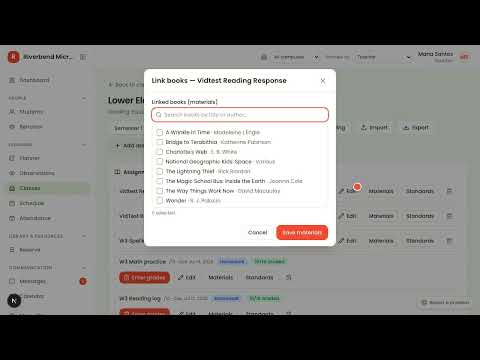 Link library books to an assignmentTeachers
 Post work habits for the termTeachers
 Print report cards for a whole classAdmins
 Set up subjects for report-card linesAdmins
 Choose how transcripts count creditsAdmins
Standards-based grading & mastery
About this featureTag assignments with standards, rate mastery where the latest evidence wins, and report skills to families — separate from GPA transcripts.
 Set up grade scales and the standards catalogAdmins
 Tag an assignment with standardsTeachers
 Rate students on an assignment's standardsTeachers
 View the class mastery matrixTeachers
 Post term mastery ratings (standards-based class)Teachers
 Review skills and standards mastery for a classFamilies
 See your skills and standards mastery in a classStudents
Lesson planning & Home Days
About this featurePlan the week in a drag-friendly grid, bump what slips, print the sub packet, and share plans with families — including checklist-driven Home Days for hybrid schools.
 Plan a lesson in the week gridTeachers
 Copy last week's lessons into this weekTeachers
 Bump a lesson to the next class meetingTeachers
 Plan a home day with a family checklistTeachers
 Publish the week's plans to familiesTeachers
 Work through the This Week home checklistFamilies
 Bump a whole day forward when the schedule blows upTeachers
 Lock a lesson to its dateTeachers
 Save a lesson as a template and reuse itTeachers
 Map units in the Year at a glance viewTeachers
 Write the class runbook for a substituteTeachers
 Tag standards and library books on a lessonTeachers
 Check standards coverage and find the gapsTeachers
 Differentiate one lesson for a multi-age classTeachers
 Create a gradebook assignment from inside a lessonTeachers
 Discuss a lesson in commentsTeachers
 Print a week of lesson plansTeachers
 Print the sub packet for a sick dayTeachers
 Choose what families see from your lesson plansTeachers
 Share lesson plans with a read-only linkTeachers
 Set up Home Days for a hybrid scheduleAdmins
 Attach files and photo moments to a lessonTeachers
 See how home days went on the dashboardTeachers
 Flag a home-day struggle for the teacherFamilies
 Check off your work in This WeekStudents
 Flag a task you're stuck on for your teacherStudents
 See what your child is learning this weekFamilies
 See what you're learning this week and notes from schoolStudents
 Print this week's home plansFamilies
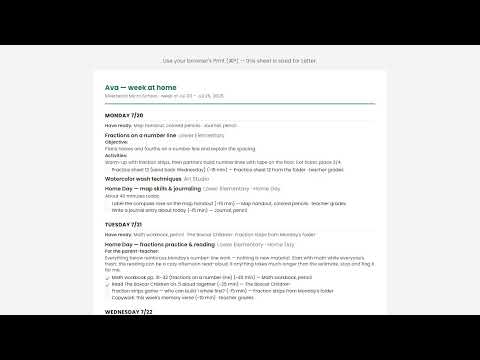 Print your week as a take-along checklistStudents
 Set the lesson plan sections teachers fill inAdmins
 Lay out a year of units and pacingAdmins
 Split This Week into a sheet per childFamilies
Admissions, enrollment & re-enrollment
About this featureA public application form that feeds a checkpoint pipeline, interviews with named interviewers, one-click enrollment, and spring re-enrollment that chases its own responses.
 Set up the public online application formAdmins
 Apply to a school through the public application formFamilies
 Add an applicant and enroll them as a studentAdmins
 Import applicants from CSVAdmins
 Schedule an applicant interview and assign interviewersAdmins
 Open re-enrollment and chase responsesAdmins
 Confirm your child is returning next yearFamilies
 Let the school know your child is not returningFamilies
 Convert an accepted applicant into a studentAdmins
 Add questions to your application formAdmins
 Put your application form on your own websiteAdmins
 Collect interest inquiries from families not ready to applyAdmins
 Ask a school for informationFamilies
 Charge an application and registration feeAdmins
Attendance, schedule & calendar
About this featureA tap per kid on attendance, bell periods and breaks behind the schedule, and one school calendar every family and student sees in their portal.
 Take attendance for a classTeachers
 Set up periods, breaks, and rotation daysAdmins
 Add a school event or closure to the calendarAdmins
 Check a child's attendance historyFamilies
 Check the family calendarFamilies
 Check your attendance history and calendarStudents
 Check your calendar for due dates and today's scheduleStudents
 Put a class on the timetable with time slots and a roomAdmins
 Set your class's weekly meeting timesTeachers
 Cancel or move a single class meetingAdmins
 Switch to a block rotation (A/B day) scheduleAdmins
 Set a teacher's availability and daily class capAdmins
 See today's schedule for your familyFamilies
 See today's class scheduleStudents
 Open a day on the calendar and work from itAdmins
 Work the Needs you today listAdmins
Health, behavior & safety
About this featureAllergies that badge the student everywhere, medication logs, printable emergency cards, behavior notes families actually read, and a handbook ladder every adult follows the same way.
 Record allergies, conditions, and emergency infoAdmins
 Record immunization doses and exemptionsAdmins
 Add a medication order and log dosesAdmins
 Log a health office visit or injuryAdmins
 Print field-trip emergency cards for a classAdmins
 Run annual health confirmationsAdmins
 Complete the annual health information confirmationFamilies
 Send a correction to your child's health recordFamilies
 Log a behavior incidentAdmins
 Log a positive behavior note and share it with the familyAdmins
 Review and lock a behavior entryAdmins
 Read behavior notes shared by the schoolFamilies
 Print emergency cards for your classTeachers
 Log a classroom observation on a childTeachers
 Share or unshare an observation with the familyTeachers
 Attach an exemption letter or health formAdmins
 Bulk-import health records from a spreadsheetAdmins
 Use your state's suggested vaccine checklistAdmins
 Set your behavior handbook ladder and incident vocabularyAdmins
Volunteers & service hours
About this featurePost the jobs a term actually needs, let families claim a spot or answer a direct request, keep fingerprint clearances current, and hand the board an hours report at year end.
 Set up volunteer teams and positionsAdmins
 Staff a volunteer event and send the requestsAdmins
 Answer a request to serveFamilies
 Claim an open volunteer spotFamilies
 Add a volunteer and run check-inAdmins
 Track fingerprint clearances before they expireAdmins
 Create a volunteer event that repeatsAdmins
 Copy a volunteer event to new datesAdmins
 Choose how volunteers sign upAdmins
 Block out days you can't volunteerFamilies
 Export volunteer hoursAdmins
Tuition & billing
About this featurePut each family on a plan, run billing once a month, and let Stripe and automatic reminders do the collecting — families pay right in the portal.
 Create a tuition plan and add studentsAdmins
 Connect Stripe for online tuition paymentsAdmins
 Run this month's billingAdmins
 Record a payment on an invoiceAdmins
 Send a payment reminder or void an invoiceAdmins
 Pay a tuition invoice onlineFamilies
 Build your fee catalog with reusable fee typesAdmins
 Assess a fee to a class, grade, or group of studentsAdmins
 Waive a student's fee or cancel a fee batchAdmins
 Create a one-time invoiceAdmins
 Put a student on a tuition planAdmins
 Export invoices and payments for your bookkeeperAdmins
 Check your balance and payment historyFamilies
 Bill tuition weekly, biweekly, quarterly, or half-yearlyAdmins
 Split an annual plan into monthly installmentsAdmins
 Choose how long a tuition plan bills forAdmins
 Set up automatic tuition paymentsFamilies
 Pay tuition with your ESA or voucherFamilies
 Download your year-end family statementFamilies
Financial aid, scholarships & ESA
About this featureSet the year's aid budget, take applications in the portal, decide them against a sliding scale, and let every award land on the invoice by itself — plus the ESA and scholarship paperwork states keep asking for.
 Set your financial aid budget for the yearAdmins
 Open financial aid applications to familiesAdmins
 Apply for financial aidFamilies
 Review a family's aid application and decideAdmins
 Award a scholarship or discount to a studentAdmins
 Check your financial aid decisionFamilies
 Set up a sliding scale of income bandsAdmins
 Turn on the automatic sibling discountAdmins
 Renew or end an expiring aid awardAdmins
 Set your ESA vendor name so families can find youAdmins
 Send an ESA invoice and record the paymentAdmins
 Reconcile ESA settlements from a CSVAdmins
 Produce the ESA and scholarship verification packAdmins
 Credit a scholarship upfront and bill the family the differenceAdmins
 Match a program deposit to the right student and invoiceAdmins
 Reconcile ClassWallet payments from the vendor reportAdmins
 Track what the scholarship program still owes youAdmins
 Export the ESA tuition worksheetAdmins
 Work through the ESA compliance checklistAdmins
 Print the tuition and fees disclosureAdmins
 Build the AUP evidence pack for your auditorAdmins
 Run Texas TEFA complianceAdmins
 Run Iowa Students First ESA complianceAdmins
 Run Louisiana LA GATOR complianceAdmins
 Run Florida FES & Step Up scholarship complianceAdmins
 Run Arizona ESA & ClassWallet complianceAdmins
 Run Utah Fits All Scholarship complianceAdmins
Library, resources & reservations
About this featureBarcode labels you print yourself, a scan station for checkout, holds families place from home, shared equipment reserved with dates instead of arguments — and the textbooks, shelf counts, and supply cupboard that come with all of it.
 Add a book and print barcode labelsAdmins
 Check library books out and inAdmins
 Review checkout history and chase overdue booksAdmins
 Manage the hold queue on a library bookAdmins
 Track a school resourceAdmins
 Reserve library books and school resources for your classroomTeachers
 Place a hold on a library bookFamilies
 Reserve school equipment or a resource for specific datesFamilies
 Cancel a book hold or resource reservationFamilies
 Place a hold on a library bookStudents
 Reserve a school resource for specific datesStudents
 Cancel a book hold or resource reservationStudents
 Print barcode labels for books and resourcesAdmins
 Book a resource out to a student and log its returnAdmins
 Check your child's library books and due datesFamilies
 See which library books you have out and when they're dueStudents
 Build the textbook catalog and assign titles to classesAdmins
 Issue a class set of textbooksAdmins
 Collect a class set of textbooks at term endAdmins
 Print textbook slips for a class or the whole schoolAdmins
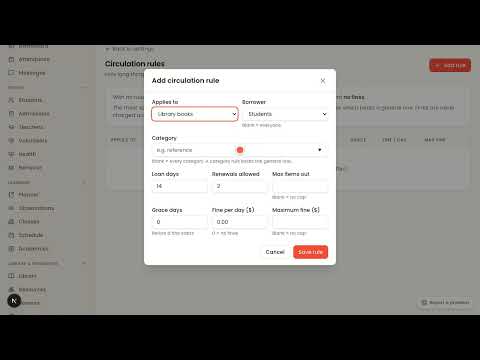 Set loan lengths, renewals, and overdue finesAdmins
 Renew a loan or charge an overdue fineAdmins
 Scan a student's ID card and check out a whole stackAdmins
 Count a shelf without shutting the libraryAdmins
 Finish a count and reconcile what's missingAdmins
 Track a consumable and set its reorder pointAdmins
 Record stock used, received, or counted on the shelfAdmins
 Reorder a consumable that's running lowAdmins
Messages & announcements
One compose reaches every family's portal inbox — plus teacher-to-family threads and an oversight search so leadership can stand behind every message.
 Send a school-wide announcement to all students or all teachersAdmins
 Send a message to a class, student, or colleagueTeachers
 Investigate messages with oversight searchAdmins
 Read messages from the school and teachersFamilies
 Message several classes at onceAdmins
 Turn on the weekly family digestAdmins
 Read messages from your school and teachersStudents
Family & student portals
About this featureOne login per family: every child's grades, attendance, this week's plans, library books, and invoices — and a student portal that answers "what do I owe and when."
 Set up your parent portal account from the school's invitationFamilies
 Open a child's full record from the portal homeFamilies
 Switch between siblings with the child switcherFamilies
 Find and contact a child's teacherFamilies
 Set up your student portal accountStudents
 Look up your teacher's contact info and class timesStudents
 See classroom observations shared by the teacherFamilies
 Read notes and observations your teachers sharedStudents
The family app on a phone
About this featureThe same portal, installed to a parent's home screen straight from the browser — no app store — with push notifications for the messages, grades, and absences that can't wait for email.


Student records & compliance
About this featureAdd or import students, print a complete records packet when a family transfers, bring years of academic history in from CSV, and audit every change in the activity log.
 Add a student and their guardianAdmins
 Import students from CSVAdmins
 Import past academic history from CSVAdmins
 Print a report card, transcript, or records packetAdmins
 Withdraw a student (and reactivate them later)Admins
 Review the activity logAdmins
 Add a guardian and set the billing contactAdmins
 Print a student's transcriptAdmins
 Reactivate a withdrawn studentAdmins
 Download a compliance extractAdmins
 Audit who has opened a student's recordAdmins
 Add a student photo for their ID cardAdmins
 Issue ID numbers to every studentAdmins
 Design your student ID cardAdmins
 Print student ID cardsAdmins
School setup & the year cycle
Configure the school once — branding, years and terms, classes, staff, roles — then let the June rollover wizard carry it all into the new year.
 Configure school profile, grade ladder, and required immunizationsAdmins
 Upload your school logo and set brand colorsAdmins
 Add an academic year and grading termsAdmins
 Create a classAdmins
 Enroll a student in an existing class (and remove one from the roster)Admins
 Add a teacher profileAdmins
 Update your teacher profileTeachers
 Create a custom roleAdmins
 Add a staff user and scope their accessAdmins
 Run the year-end rollover wizardAdmins
 Add a second campusAdmins
 Rename grade levels to match your programAdmins
 Choose your school type and switch modules on or offAdmins
 Set up work habits & conduct for report cardsAdmins
 Assign a class to a teacher, co-teacher, or assistantAdmins
 Add a staff user and choose their roleAdmins
 Customize one user's access with an overrideAdmins
 Give a staff member access to one student's recordAdmins
 Run an access review — who can see whatAdmins
 Deactivate a staff account without deleting itAdmins
 Set one class to cover several subjectsAdmins
 Set your school's time zoneAdmins
Rather see the price?
Everything in these videos is in every plan. One price, published in full.